
Prices with and without VAT on Shopify: EU rules and a VAT toggle
Showing VAT to consumers and businesses in the EU, every EU VAT rate, and how VAT Switcher shows each shopper the right prices automatically.

Written by: Jere Merivirta · Founder, Merivirta Digital
Published 13 min read
Short answer
Consumers must always see the final price including VAT, while business buyers can be shown net prices. Shopify gives each visitor one price view, so a store that sells to both needs a VAT toggle. Merivirta VAT Switcher reads your tax settings from Shopify and switches every price in the store between incl. and excl. VAT in one click.
Last tested
Merivirta VAT Switcher is now approved and live on the Shopify App Store. It solves a problem every store that sells to both businesses and consumers runs into: consumers want the final price with VAT, while business buyers compare net prices, because they reclaim the VAT anyway. Show only one of them and the other group does mental maths or leaves.
Try it free in your own store. Install VAT Switcher from the Shopify App Store and the toggle is live in a few minutes, with no code. Start the trial on Pro and you can use every feature free of charge.
This article covers what to remember about showing VAT when you sell in the EU, the VAT rates of every EU country, and everything VAT Switcher handles for you.
Showing VAT when you sell in the EU
Consumers (B2C): always the final price with VAT
When you sell to consumers, prices are shown as the final selling price including VAT. The rule comes from the EU Price Indication Directive (98/6/EC), and every member state has its own version of it, with small differences in the details.
In practice, net prices must never be the only price a consumer sees. If you show both, keep the price including VAT clearly visible.
Businesses (B2B): net prices are normal
A business customer reclaims the VAT on its purchases, so the number that matters to them is the net price. Showing prices excluding VAT is normal in sales aimed at businesses. The trouble starts when one store serves both groups: each of them needs to see the right price.
When you sell goods to a business in another EU country that has a valid VAT number, the reverse charge usually applies: you invoice without VAT and the buyer accounts for it in their own country. If you use Shopify Tax and turn on the company VAT number field in checkout, Shopify validates the number the customer enters and removes the VAT from the order when the conditions are met.
Selling to consumers in other EU countries: the €10,000 threshold and OSS
Once your sales to consumers in other EU countries pass €10,000 a year in total, you charge the VAT of the customer’s country instead of your own. You report it in one place through the One Stop Shop (OSS), so you don’t have to register in every country.
For prices, this means a Swedish consumer’s price including VAT is calculated at Sweden’s 25 % and a German consumer’s at Germany’s 19 %. In Shopify Markets you choose whether the final price stays the same in every country or follows each country’s VAT rate.
Outside the EU
Goods exported outside the EU are usually sold without EU VAT, and the buyer pays their own taxes and duties on import. For these visitors a VAT toggle is often pointless or even misleading, so a good setup lets you hide it or show net prices instead.
The checkout is not the problem. Shopify calculates the right tax at checkout from your settings and the customer’s address. The question is how prices are shown while people browse.
VAT rates in the EU
Every EU country has its own standard rate and one or more reduced rates for things like food, books and medicines. The name of the tax changes too: ALV in Finland, moms in Sweden and Denmark, MwSt in Germany and TVA in France.
| Country | Name of the tax | Standard rate | Reduced rates |
|---|---|---|---|
| Austria | USt | 20 % | 4.9 % / 10 % / 13 % |
| Belgium | BTW/TVA | 21 % | 6 % / 12 % |
| Bulgaria | DDS | 20 % | 9 % |
| Croatia | PDV | 25 % | 5 % / 13 % |
| Cyprus | FPA | 19 % | 3 % / 5 % / 9 % |
| Czechia | DPH | 21 % | 12 % |
| Denmark | moms | 25 % | – |
| Estonia | KM | 24 % | 9 % / 13 % |
| Finland | ALV | 25.5 % | 10 % / 13.5 % |
| France | TVA | 20 % | 2.1 % / 5.5 % / 10 % |
| Germany | MwSt | 19 % | 7 % |
| Greece | FPA | 24 % | 6 % / 13 % |
| Hungary | AFA | 27 % | 5 % / 18 % |
| Ireland | VAT | 23 % | 4.8 % / 9 % / 13.5 % |
| Italy | IVA | 22 % | 4 % / 5 % / 10 % |
| Latvia | PVN | 21 % | 5 % / 12 % |
| Lithuania | PVM | 21 % | 5 % / 12 % |
| Luxembourg | TVA | 17 % | 3 % / 8 % |
| Malta | VAT | 18 % | 5 % / 7 % / 12 % |
| Netherlands | btw | 21 % | 9 % |
| Poland | VAT | 23 % | 5 % / 8 % |
| Portugal | IVA | 23 % | 6 % / 13 % |
| Romania | TVA | 21 % | 11 % |
| Slovakia | DPH | 23 % | 5 % / 19 % |
| Slovenia | DDV | 22 % | 5 % / 9.5 % |
| Spain | IVA | 21 % | 4 % / 10 % |
| Sweden | moms | 25 % | 6 % / 12 % |
The table is VAT Switcher’s own rate table, checked on 19 October 2026 against the European Commission’s and national tax authorities’ sources. Which reduced rate applies depends on the product, so always confirm your product’s rate with the country’s tax authority or your accountant.
What Shopify does on its own
Shopify lets you choose whether your prices include tax. You set it in Settings → Taxes and duties with Include sales tax in product price and shipping rate, and with Markets you can set tax-inclusive pricing for each market.
That gives each visitor one price view. What Shopify’s settings don’t do is let the same visitor switch between the two views, or show both prices side by side. Shopify’s own help also notes that when your prices include tax, prices without tax can’t be shown to specific customers, such as your business customers. That gap is what VAT Switcher fills.
Merivirta VAT Switcher: every feature
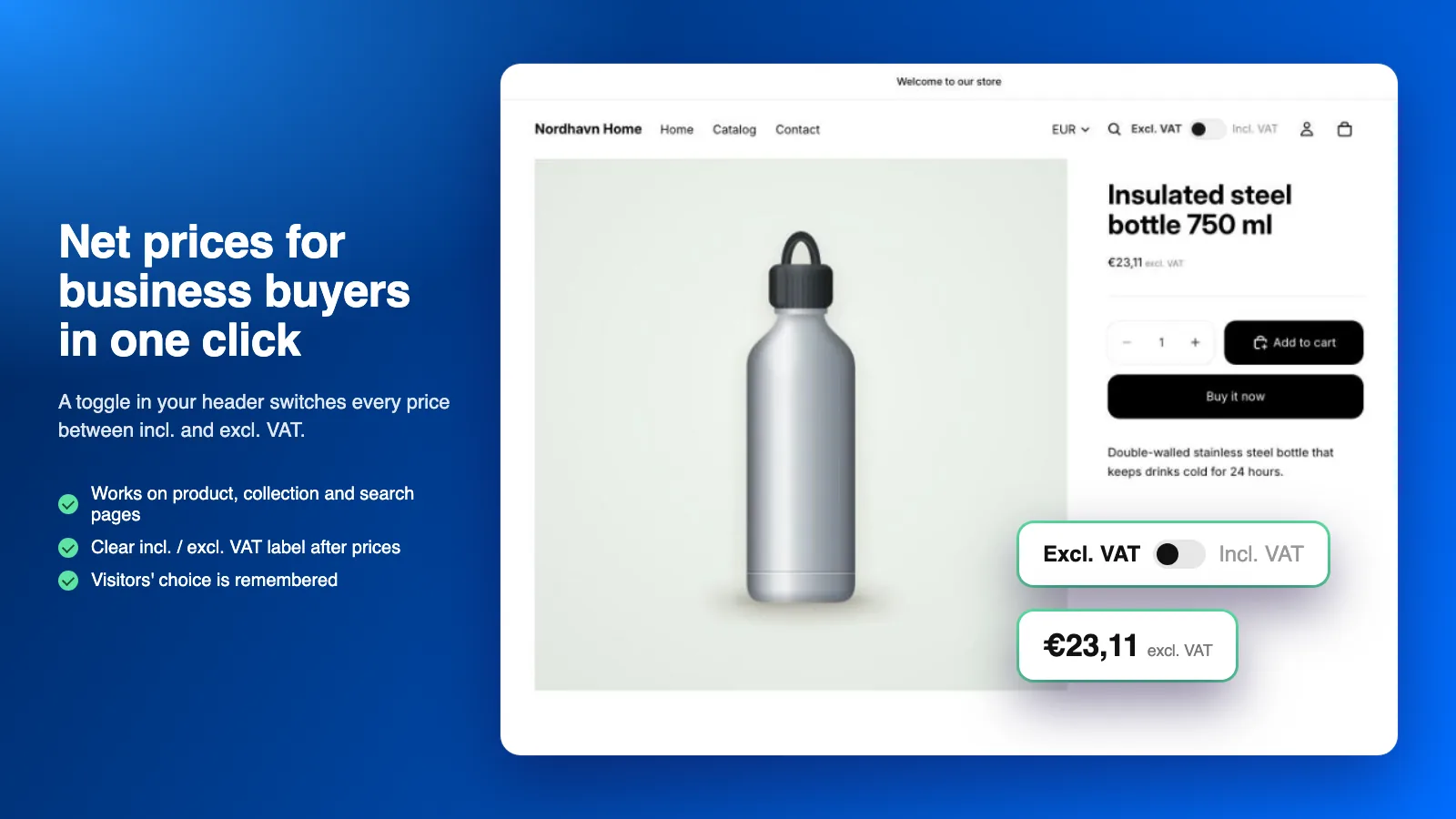
Every price switches in one click
The toggle switches every price in your store between incl. and excl. VAT: product pages, collections, search and search suggestions, quick view, the cart drawer, the cart page, line totals and the subtotal. Cart line totals can follow the same unit price as the product page, so rounding never adds a cent of difference. Prices the theme draws later, such as a variant change, the cart drawer or infinite scroll, switch too. The choice is remembered as the shopper moves around and when they come back.
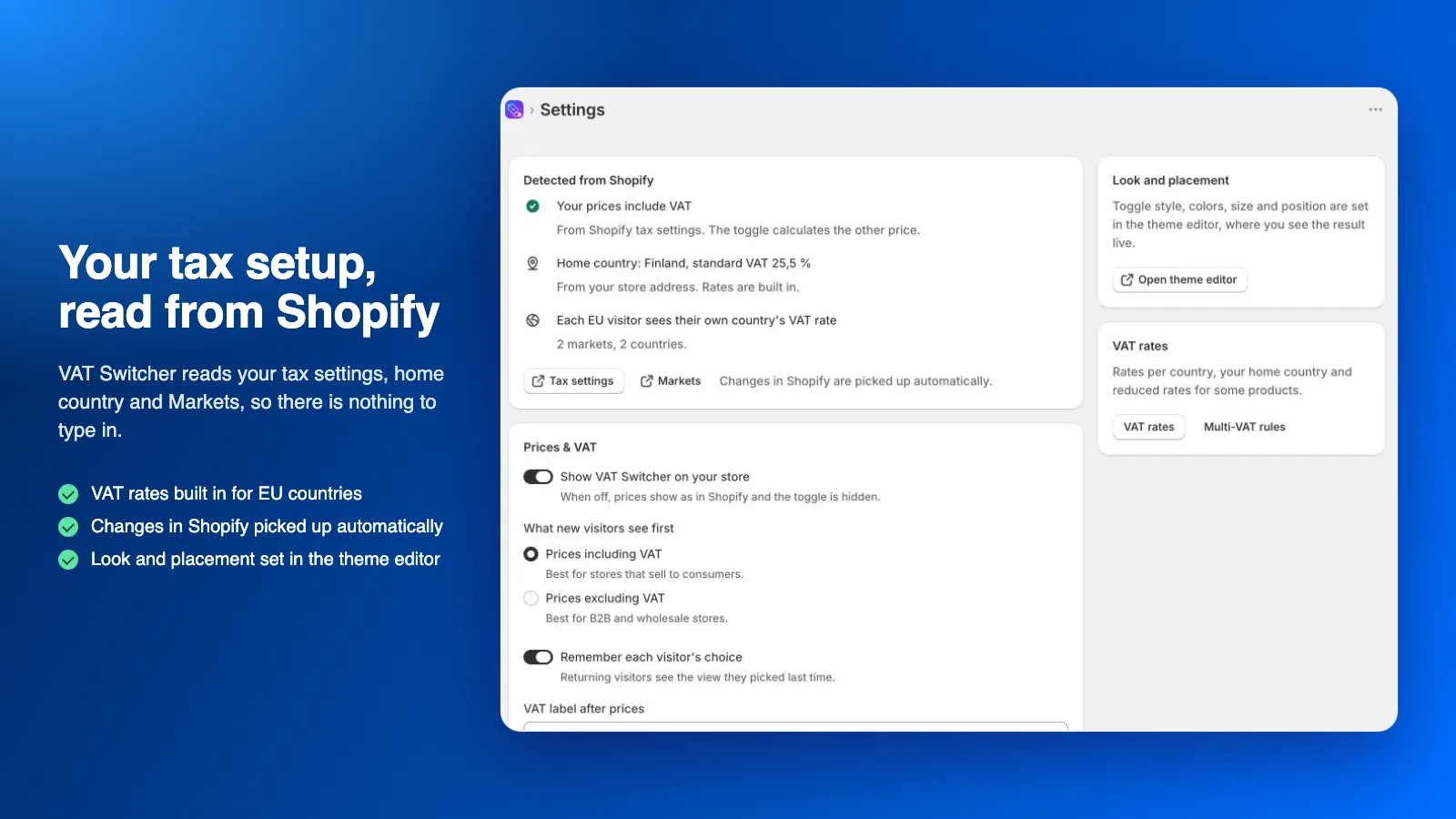
Your tax setup is read from Shopify
VAT Switcher reads from Shopify whether your prices include tax, your home country, the countries you sell to and how each market displays tax. When you change something in Shopify, the app picks it up on its own. Nothing to type in twice.
VAT rates for 48 countries built in
The rates of every EU country and 21 other countries are built in, reduced rates included. If a rate changes before we update it, you can override it yourself in the app.
Each EU visitor sees their own country’s rate
If you sell through OSS, a Swedish visitor sees prices at Sweden’s rate and a German visitor at Germany’s. The app also follows your Markets settings per country: if you set a country to show prices without tax, the app knows.
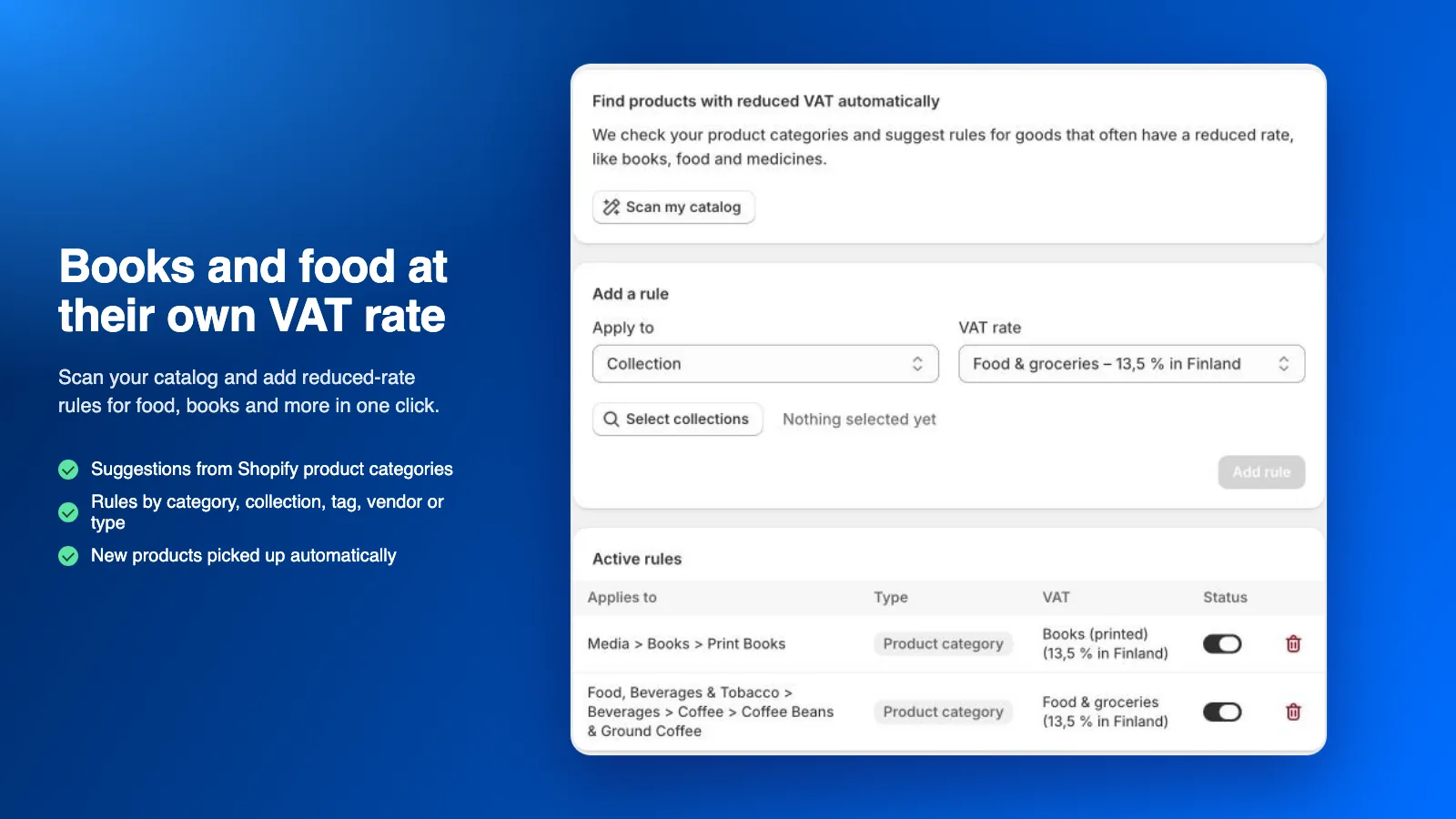
Reduced rates for books, food and more (Multi-VAT)
If you sell goods at different rates, give them their own rate by product, collection, tag, vendor, product type or Shopify product category. The app picks the right rate for each visitor’s country automatically. Scan my catalog goes through your product categories and suggests rules for goods that often have a reduced rate. You accept the suggestions; nothing is applied on its own. New products are covered by the rules automatically.
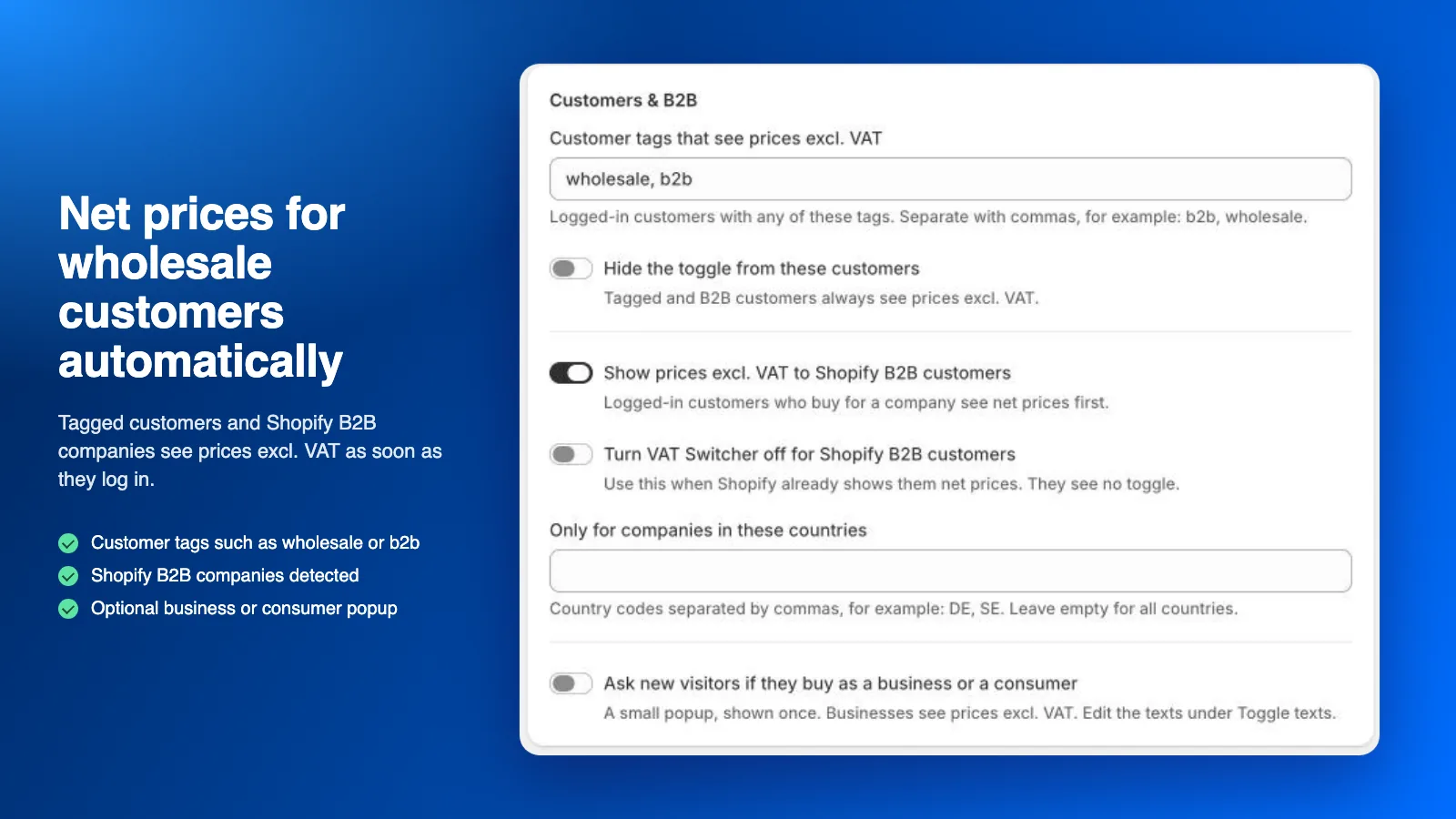
Business customers see net prices automatically
Signed-in customers with a tag you choose (for example wholesale or b2b) see prices excluding VAT straight away. On the Pro plan the app also detects Shopify B2B company customers, and you can limit the rule to companies in certain countries. You can hide the toggle from these customers, or turn the app off completely for Shopify B2B customers if Shopify already shows them net prices.
You also choose who sees VAT Switcher at all: everyone, only signed-in customers, or only business customers. Everyone else sees your store’s normal prices.
Ask new visitors: business or consumer?
A small popup asks each new visitor once whether they buy for a business or for themselves, and shows the right prices from then on. You can edit its texts.
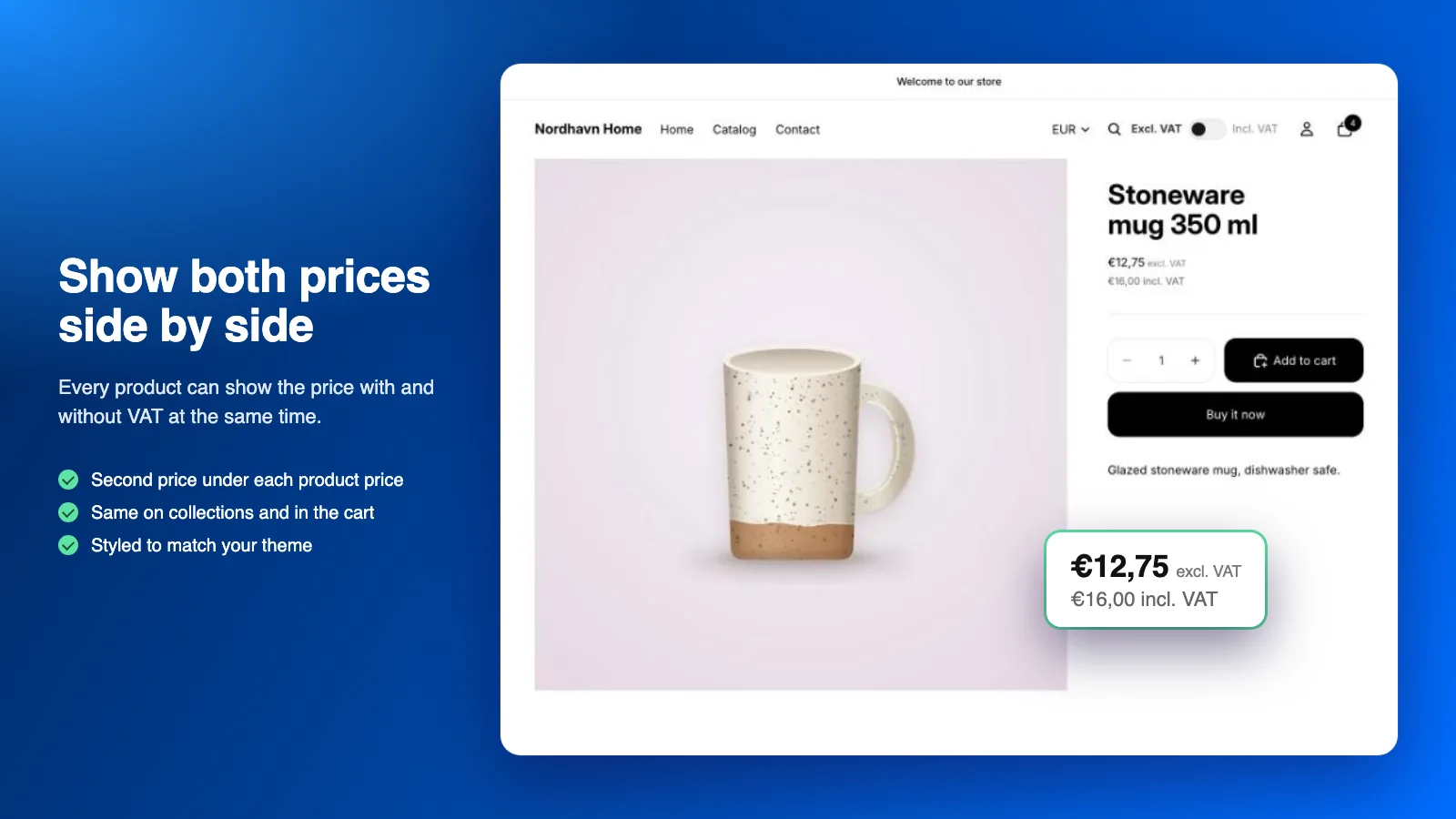
Both prices side by side
If you like, every product shows the other price too, for example “€12.75 excl. VAT” and “€16.00 incl. VAT”. Show them stacked or inline, and at the same size when the price including VAT needs to be as visible as the net price. A small “incl. VAT” or “excl. VAT” label can follow product prices, or every price including the cart. Set the colour and size of the label and the second price in the theme editor.
Lock net prices for business customers
This is what most stores use the app for: the public store shows everyone prices including VAT, but a signed-in business customer sees every price excluding VAT straight away. Hide the toggle from these customers and their view is locked, so they never see prices with VAT by mistake. Shopify can’t do this on its own, because its tax-inclusive prices look the same to everyone.
You can also choose what new visitors see first, or lock the whole store to one view. A store that sells only to businesses usually doesn’t need a toggle at all: it enters its prices in Shopify without tax, so prices don’t include VAT.
Visitors from outside the EU
For visitors from countries where you don’t charge VAT, show the normal toggle, hide it completely, or show net prices only. You can also show net prices to everyone outside your home country if you ship with taxes and duties paid by the customer.
The name of the tax in the shopper’s language
The toggle and price labels follow the store’s language. In Swedish they read “inkl. moms” and “exkl. moms”, in Danish “inkl. moms” and “ekskl. moms”, in German “inkl. MwSt.” and “zzgl. MwSt.”, in French “TTC” and “HT” and in Dutch “incl. btw”. Texts are built in for English and 24 European languages. If your store has other languages, the app translates the texts for them automatically, and you can always write your own text for each language.
The name follows the language the customer browses in. A Swedish customer sees “moms” when your store has a Swedish version; browsing your English store, they see “VAT”.
Look and placement in the theme editor
Pick from 10 toggle styles, such as a switch, segmented buttons, a dropdown or a price tag. Set colours, size, corners and position in the theme editor and see the result live. Put the toggle in the header, floating, or in its own block, or click the exact spot in your store, separately for desktop and mobile, even inside the mobile menu. On mobile the toggle can stay where it is on desktop, float, or be hidden. No code needed.
The theme editor also gets two ready-made sections:
- VAT bar is a bar of its own for the toggle and a short message, such as “Business customer? See prices excl. VAT.” Choose its colours, layout and width.
- VAT toggle can be added to any page, for example next to the price on the product page.
On the Pro plan the floating toggle can also be a card with a title, so it stands out clearly on the page.
Works with unusual themes too
VAT Switcher finds the prices in Shopify’s most common themes on its own. If your theme shows prices in its own elements, the advanced settings let you add extra price elements, limit the switch to certain areas, or leave an area alone. Not sure? Ask us and we will look at your theme for you.
Try it before you switch it on
The app’s Feature demo page shows every toggle style and lets you see how prices look in other languages and for visitors from other countries, before you turn anything on in your store. On the Help & FAQ page Virta, our AI assistant, knows the app and passes your question to us when needed.
Products, theme and checkout stay as they are
VAT Switcher never changes your products, prices or theme files, so a theme update won’t break it. It doesn’t calculate, collect or file tax and doesn’t change the checkout either: Shopify handles the tax at checkout as before. Settings are stored in your store, so prices still show correctly even if our server is briefly down.
Getting started
- Install Merivirta VAT Switcher from the Shopify App Store and pick a plan. Every plan starts with a free trial, and we recommend starting on Pro so you can try everything.
- Check on the app’s dashboard that your tax settings and markets were detected correctly, and activate the app.
- In the theme editor, turn on the app embed and choose the toggle’s style and position.
- Add your business customer tags and reduced-rate rules if you need them.
Plans
| Starter | Pro | |
|---|---|---|
| Price | $9.99 / month | $24.99 / month |
| Toggle on every page and in the cart | ✓ | ✓ |
| Your country’s VAT rate automatically | ✓ | ✓ |
| 10 styles, your colours and placement | ✓ | ✓ |
| Both prices side by side | ✓ | ✓ |
| Net prices for tagged customers | ✓ | ✓ |
| Lock the view and hide the toggle | ✓ | ✓ |
| Reduced rates (Multi-VAT) | ✓ | |
| Visitor-country rates (OSS and Markets) | ✓ | |
| Shopify B2B detection | ✓ | |
| Floating card and visitor popup | ✓ | |
| Rules for visitors from outside the EU | ✓ |
Prices are in US dollars and billed by Shopify with your store’s invoice. Both plans include a free trial, and you can switch plans at any time.
Install VAT Switcher from the Shopify App Store
If something doesn’t work in your theme, ask Virta on the app’s Help page or ask us for a reply by email.
For your developer: the app is a theme app extension (app embed, a “VAT toggle” block and a “VAT bar” section) that reads its settings from app metafields in Liquid. API: window.VatSwitcher.getMode() / setMode() / refresh(), the vat-switcher:change event and the body classes vsw-mode-incl / vsw-mode-excl.
Sources
- Merivirta VAT Switcher on the Shopify App Store
- Directive 98/6/EC on consumer protection in the indication of prices
- European Commission: One Stop Shop (OSS)
- European Commission: VAT rates in the EU
- Shopify Help Center: Including or excluding tax in product prices
- Shopify Changelog: VAT number validation in checkout
Not sure how to show prices in your store? Ask Virta, our assistant in the corner of this page.
Questions and answers
Do online stores have to show prices including VAT?
To consumers, yes. The EU Price Indication Directive requires the final selling price including VAT and all other taxes. In sales aimed only at businesses, net prices are common.
Can Shopify show prices with and without VAT at the same time?
Not on its own. Your tax settings decide whether prices include tax, for the whole store or per market, so each visitor sees one view. Showing both, or a switch between them, needs a change in the theme or an app such as Merivirta VAT Switcher.
Does a VAT toggle change the price customers pay?
No. The toggle only changes how prices are shown in the store. Shopify still calculates the tax at checkout from your tax settings and the customer's address.
Does VAT Switcher use the local name of the tax?
Yes, in the language of the store. In Swedish the toggle reads "inkl. moms" and "exkl. moms", in German "inkl. MwSt." and in French "TTC" and "HT". Texts are built in for English and 24 European languages, and any other store language is translated automatically. The name follows the language the customer browses in, not their country.
Can business customers see net prices automatically?
Yes. VAT Switcher shows prices excluding VAT to signed-in customers with a tag you choose (for example wholesale), and on the Pro plan also to Shopify B2B company customers.
Will the app slow down my store?
It should not. VAT Switcher reads the prices already on the page and switches them in the browser. Its settings are stored in your store, so the storefront does not call our server on every page view.
How much does VAT Switcher cost?
Starter is $9.99 and Pro $24.99 a month, both with a free trial. Starter covers a store that sells at one VAT rate in one country. Pro adds reduced rates, visitor-country rates, Shopify B2B detection, the floating widget, the visitor popup and country rules. You install it straight from the Shopify App Store.
 Our app for this VAT Switcher On the Shopify App Store
Want this done for your store?
Ask Virta, our AI assistant. It answers right away, collects the details, and one of our experts gets back to you personally.
Ask VirtaKeep reading
-
 Video
Problems and fixes
Shopify product images: how to make images that sell without slowing your store
Size, aspect ratio, framing, alt text, variant images and Google Shopping and Meta feeds. Shopify’s and Google’s guidance, plus a ready checklist for product images.
-
 Video
How we work
Meet Virta: an AI assistant that doesn’t pretend
Why we built our AI assistant Virta, how it gathers the basics before an expert replies, how we teach it, and what the AI Act and GDPR mean for it in practice.
-
 Video
Problems and fixes
Get your Shopify store found in ChatGPT and Google’s AI search
How AI assistants pick products, and what a Shopify store can do now: product data, structured data, FAQs, collections, llms.txt and Shopify Catalog.
